Browser extension
The fastest way to add an item to your wishlist
Open a product page in any online store and click the Wishfox icon.
Pick a list.
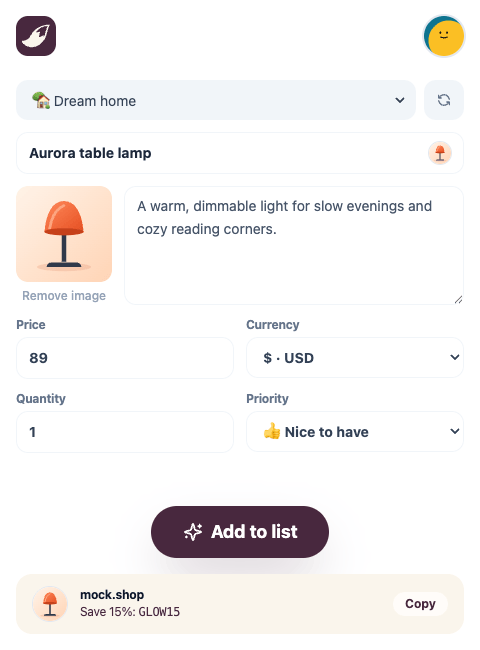
Click Add. Wishfox fills in the name, photo and price for you.
Quick add button
No extension for your browser? Drag this button to your bookmarks bar. One click on a product page opens Wishfox with the product ready to save.
Drag this button up to your bookmarks bar. Clicking it on this page does nothing.
How it works
Open a product page in any online store.
Click the Wishfox button in your bookmarks bar.
Wishfox opens with the product link filled in. Pick a list and save.
On a computer (Chrome, Safari, Edge, Firefox)
Show your bookmarks bar with CmdShiftB on a Mac or CtrlShiftB on Windows.
Drag the + Wishfox button from this page onto the bookmarks bar.
On iPhone and iPad (Safari)
Copy the code below.
In Safari, tap Share and choose Add Bookmark to save any page.
Open Bookmarks, touch and hold the new bookmark, then tap Edit.
Rename it to Wishfox and replace its address with the copied code.
javascript:(function(){var d=document,o='https://wishfox.app';if(location.origin===o)return;var m=d.querySelector('meta[property="og:title"]'),t=(m&&m.content)||d.title||'';window.open(o+'/share?url='+encodeURIComponent(location.href)+'&title='+encodeURIComponent(t),'_blank','noopener');})()Works in most online stores. If you're not signed in, Wishfox asks you to sign in first.
Some stores block buttons like this. If it doesn't work, copy the product link and paste it into Wishfox instead.
Your perfect gift is one list away.
Share your wishes with the people who matter. No duplicate gifts, no guessing, just the joy of giving.
Get started for free